


Introduction
Welcome to our monthly update on Microsoft Dynamics 365 and Power Platform! Each month, we bring you the latest news, features, and enhancements to help you stay ahead in the ever-evolving world of business applications. Whether you’re a seasoned professional or just getting started, our updates will provide you with valuable insights and tips to maximize the potential of these powerful tools. Stay tuned for the latest developments and learn how you can leverage Dynamics 365 and the Power Platform to drive innovation and achieve your business goals.
Service Updates
The 2025 release wave 1 release plans became available January 23. This release wave covers new features releasing from April 2025 through September 2025. Early access will begin February 3, 2025, with general availability starting April 1, 2025. Below are links to the full list of features with completed and/or planned release dates:
- Power Apps
- Power Pages
- Power Automate
- Microsoft Copilot Studio
- AI Builder
- Microsoft Dataverse
- Dynamics 365
Dec/Jan monthly updates for model-driven apps
Admins will now have the ability to enable tooltips for labels on form fields
Tooltips are generated using the field’s name and description. These used to be always on. With this change, admins are able to enable/disable them while having them turned off by default.
Smart Grid Searching and Filtering
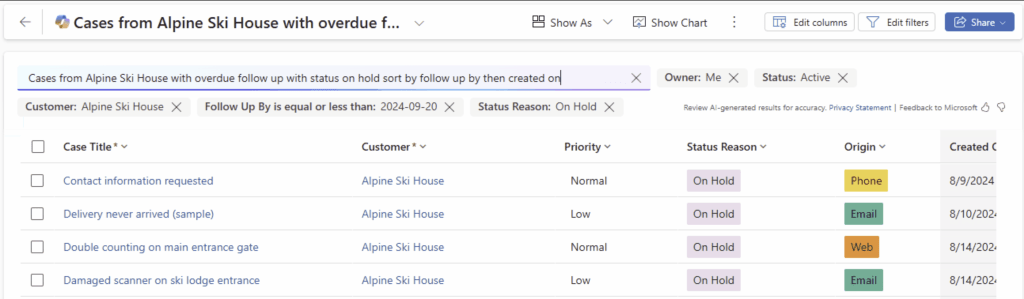
Smart Grids are now in public preview in model driven views, allowing users to find, filter, and sort their data quickly with natural language, bypassing complicated advanced filters. The feature leverages AI to make grid views a seamless interface for instant answers, finding records and initiating actions on your data, streamlining data management and improving user experience.
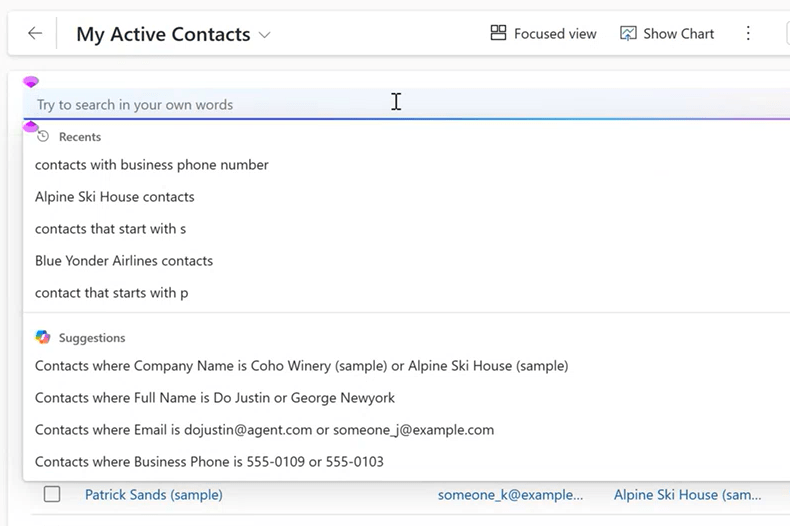
Recent prompts for natural language queries in smart grid
We are planning to test new natural language queries for smart grid. As part of this, we will enable users to select any of their last 5 prompts. Selected users will have this feature.
Product Upates
The January 2025 update brings a host of new features and enhancements across the Power Platform. Here are some of the key product updates:
- Power Apps:
- Customize Copilot chat in your apps with Copilot Studio
- React and Fluent based virtual code components
- November 2024 Feature Updates
- This month we’re excited to shared a simplified approach to writing Power Fx with Copilot, Performance improvements to the Canvas designer, Studio visual updates, and smart paste for model driven apps!
- Power Automate
- Get started with Copilot in Power Automate for desktop
- Scripting actions reference – Power Automate
- Power Automate managed key support now generally available
- The next frontier in enterprise intelligent automations with Microsoft Power Automate
- Boost productivity: Automate emails, documents, and images with Microsoft AI Builder
- Copilot Studio
- Dataverse
Deprecations or Retirements
As part of our ongoing efforts to improve the Power Platform, we are announcing several deprecations and retirements. These changes are essential for maintaining system integrity and security. Key deprecations include:
Power Apps, Power Automate, and Power Pages
- Hierarchy Control in Model-Driven Apps: Deprecated effective October 2024. Removed from the product by October 2025.
- Dataverse (legacy) and Dynamics 365 connectors retirement (future)
- Connector Certification Portal Deprecation: Decommissioned January 15, 2025
Dynamics 365
- Outbound marketing for Customer Insights features removed: Social Posting, LinkedIn Lead generation – December 2024
- Copilot for email in side pane – January 2025
- Dynamics 365 Field Service Plugin for Microsoft Copilot (Teams app) – January 2025
- Customer Service Hub app to be removed for new organizations with Enterprise licenses – February 2025
- Diagnostics in unified routing deprecated – March 2025
- Omnichannel for Customer Service on Unified Service Desk end of support – April 2025 – removed Oct 2025
- Current rich text editor taken out of service – April 2025
- Outbound marketing module of Customer Insights – Journeys removed – June 2025
Always check these sources for the latest deprecation and retirement information:
Important changes in Power Apps and Power Automate
Important changes in Canvas Apps
Important changes in Power Pages
Learning Corner
In this section, we highlight some valuable learning resources and opportunities for the Power Platform community:
- Optimize performance using FetchXml – Power Apps | Microsoft Learn
- Code Sample: Bulk Operations Sample – Code Samples | Microsoft Learn
- Implementation recommendations for Microsoft Power Platform environments – Training | Microsoft Learn
Video Roundup
Conclusion
In conclusion, the January 2025 update for Microsoft Power Platform and Dynamics 365 brings a host of exciting new features and enhancements designed to help businesses stay ahead of the curve. From the introduction of new capabilities in Power Apps, Power Automate, and Copilot Studio, to the latest advancements in Dynamics 365, these updates are set to drive efficiency, improve decision-making, and enhance overall user experience. By staying informed and leveraging these updates, organizations can maximize their investment in Microsoft’s powerful tools and continue to innovate and grow in the ever-evolving digital landscape. Stay tuned for more updates and keep exploring the endless possibilities with Microsoft Power Platform and Dynamics 365.
Looking for help with any of the topics covered today? Check out our Services page or contact us at pfedynamics@microsoft.com Happy New Year!

Leave a comment