


Welcome back to our blog! In this month’s edition, we’re excited to bring you the latest updates for May 2024 on the innovative Microsoft Power Platform and Dynamics 365. As technology continues to evolve rapidly, staying up-to-date with the newest features and enhancements is crucial for businesses to thrive. Join us as we explore the cutting-edge advancements and improvements that will empower organizations to drive productivity, streamline processes, and deliver exceptional experiences. Let’s dive right in and discover the exciting possibilities that the latest updates hold for the Power Platform and Dynamics 365!
Interested in the services our team offers? Find them here.
- Featured News
- Deprecations and Retirements
- Product Updates
- Easier than ever experience to import data from SharePoint List
- Updates for modernization and theming in Power Apps
- April 2024 ALM blog: What’s new and what it means for you
- Power Platform Advisor is generally available
- What’s new: Power Apps April 2024 Feature Update
- General Availability of Customer Managed Keys for new environments in Power Automate
- April 2024 update of Power Automate for desktop
- Hyperautomation: Unleashing enterprise efficiency with Microsoft Power Automate
- Migrate Standard Data Model Sites to Enhanced Data Model (Preview)
- Introducing Salesforce virtual table support for Power Pages (Preview)
- Summarize documents into FAQ Web Pages using Power Pages Design Studio Copilot
- Power Pages Site Copilot integration with Omnichannel for Dynamics 365 Customer Service
- Quickstart guide for building copilots with generative AI
- Use content on SharePoint or OneDrive for generative answers
- Get access to Microsoft Copilot Studio – Licensing
- Developer Environment license requirements
- Manage admin roles with Microsoft Entra Privileged Identity Management (preview)
- Extend Copilot capabilities with plugins
- Learning Corner
Featured News
Microsoft Build
In Seattle and Online: May 21-23, 2024
Attend Microsoft Build to connect with developers globally and grow your skills in topics like building copilots, generative AI, securing applications, cloud platforms, low-code, and more.

Microsoft Power Platform Conference
Copilot features in Dynamics 365 Customer Insights
Try the new Copilot capabilities in Microsoft Dynamics 365 Customer Insights. The Copilot capabilities in Dynamics 365 Customer Insights transform the way marketers work and kickstart successful marketing campaigns. Sign up to be one of the first to preview and experience the new capabilities.
Copilot in Dynamics 365 Field Service
Copilot is a next-generation AI assistant that helps you be more productive and efficient in your daily work the Dynamics 365 Field Service web app. Copilot can summarize information about your work order and service accounts, help you catch up on recent changes to your records, prepare for onsite visits, and answer questions about related information. It has a chat interface that dispatchers and technicians can use to interact with Copilot in natural language.
Deprecations and Retirements
ISV Studio is deprecated
ISV Studio is an analytics portal that shows limited install data for ISV solutions built on Dynamics CE or Power Platform and deployed from AppSource. It also provides an another access point to the connector certification wizard.
As of April 1, 2024, ISV Studio is deprecated. We notified existing users to notify them about this change. Users can still view analytics related to their solutions and access the connector certification wizard until May 31, 2024.
DLP resource exemption feature
Effective March 2024, the data loss prevention (DLP) resource exemption feature is deprecated for tenants that have never used it before. By October 2024, the resource exemption feature will be deprecated for all customers.
Omnichannel for Customer Service agent-facing app is deprecated and will be removed in June 2024
Effective April 2023, the Omnichannel for Customer Service agent-facing app is deprecated. Support is available until June 2024. We recommend that you migrate your omnichannel configuration to Customer Service workspace. More information: Migrate from Omnichannel for Customer Service to Customer Service workspace
Omnichannel for Customer Service on Unified Service Desk is deprecated and will be removed in October 2025
Effective April 4, 2024, Omnichannel for Customer Service on Unified Service Desk is deprecated. Support is available until April 2025. The app will be removed from all environments by October 2025.
Product Updates

Easier than ever experience to import data from SharePoint List
You can easily transform your SharePoint Lists into Dataverse Tables and Copilot ready canvas apps in a single experience. Moreover, when Copilot is enabled, it will assist with your table creation by providing the best fitting table names, descriptions, along with selecting appropriate column data types based on the list data. This makes it possible to bring your own data to the platform and establish your business apps in just a few clicks.
Updates for modernization and theming in Power Apps
We continued enhancing modern controls and theming and delivered some key enhancements, which are rolling out to our customers at the time of publish.
- Simple custom theming
- Stream control
- New controls
- Modern theming for classic controls
- Upcoming styling on all modern controls
April 2024 ALM blog: What’s new and what it means for you
With enterprises rapidly expanding Power Platform adoption, and non-traditional and traditional developers building business critical solutions, we’ve needed to re-imagine enterprise ALM in Power Platform. As this story unfolds, customers can adopt a unified ALM strategy across their entire portfolio while drastically reducing overhead, complexity, and failure points. This post outlines various new capabilities materializing under this vision and how to align your organization’s ALM strategy for the next generation of growth.
Power Platform Advisor is generally available
We are thrilled to announce the general availability of Power Platform Advisor. For those who are new, Power Platform Advisor, introduced at Ignite last year, is your guide to personalized recommendations to optimize your Power Platform tenant. It analyzes resources within all Managed Environments in your Power Platform tenant, and provides customized recommendations to enhance security, operational efficiency and hygiene, and overall health.
What’s new: Power Apps April 2024 Feature Update
We will use this blog to share a summary of product, community, and learning updates from throughout the month so you can access it in one easy place. This month we’ve got a great set of updates for Makers, Admins, and users across Power Apps, Dataverse and Copilot.
- Trust
- Maker Productivity

General Availability of Customer Managed Keys for new environments in Power Automate
We are excited to announce the General Availability of Customer Managed encryption keys for Power Automate for new environments following a successful public preview! As customers move more workloads from on-premises to the cloud, some need greater control over their data. With Customer Managed Encryption Keys (CMK), customers can bring their own encryption keys to secure all their cloud data at rest, to provide them with added control.
April 2024 update of Power Automate for desktop
We are happy to announce that the April 2024 update of Power Automate for desktop (version 2.43) has been released! You can download the latest release here.
Hyperautomation: Unleashing enterprise efficiency with Microsoft Power Automate
Imagine a world where every repetitive task, every mundane process, and every time-consuming operation is transformed into a symphony of automated actions, working in perfect harmony to deliver results at lightning speed. This isn’t just a fantasy; it’s a reality that Power Automate can bring, and it’s revolutionizing the way enterprises operate on a global scale.
You will learn about a comprehensive scenario with a Center of Excellence (CoE) team, using many of the capabilities in Power Automate, such as Microsoft Copilot, process mining, digital and robotic process automation (RPA), AI models, and more across Power Platform.

Migrate Standard Data Model Sites to Enhanced Data Model (Preview)
We are excited to announce that the Power Pages CLI now supports the pac powerpages migrate-datamodel command, currently in preview. This new feature facilitates the migration of your existing standard data model site to an enhanced data model.
- Generate a site customization report
- Migrate configuration data and configuration data references
- Monitor migration status
- Upgrade site data model version to the enhanced data model
- Revert the migrated site’s data model version back to the standard data model
Introducing Salesforce virtual table support for Power Pages (Preview)
Virtual tables integrate data from external sources by seamlessly representing the data as tables in the Microsoft Dataverse, without replicating the data. Earlier we released virtual table data providers for SQL Server and SharePoint, and now we are adding support for Salesforce.

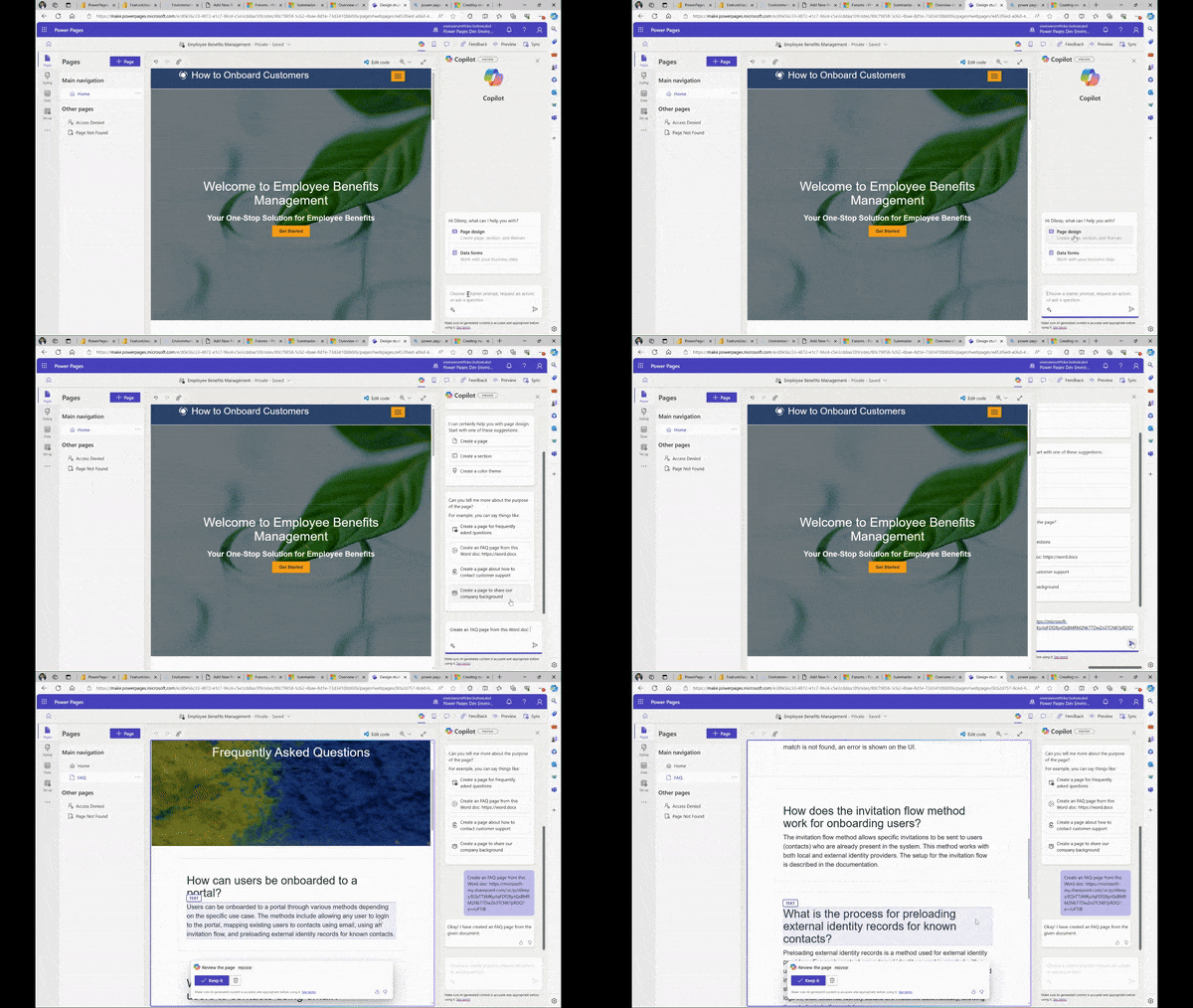
Summarize documents into FAQ Web Pages using Power Pages Design Studio Copilot
As Power Pages has become popular for website building, one common use case we see very often is to build Webpages which provides FAQ (Frequently asked questions) content about a certain topic. This process can often be cumbersome especially when the source content is large and can require multiple iterations to identify the right set of content to be included as FAQ. However, with the advent of Generative AI and its ability to generate/manipulate content into various forms, generating FAQ is one of those process where we can see amazing productivity gains.
Power Pages Site Copilot integration with Omnichannel for Dynamics 365 Customer Service
The site copilot for Power Pages websites provides quick and efficient assistance to website visitors and users. The copilot is equipped with generative answers for natural language processing to address questions and provide solutions in a conversational manner. With just a few clicks, the makers can seamlessly integrate Site Copilot (which is a Microsoft Copilot Studio copilot) on a Power Pages website.
Omnichannel for Dynamics 365 Customer Service enables enterprises to connect and engage with their customers instantly through live chat. This omnichannel approach ensures that businesses are accessible across multiple touchpoints, allowing for seamless communication and interaction.

Quickstart guide for building copilots with generative AI
It’s even simpler to build a copilot using AI-powered capabilities in Microsoft Copilot Studio. Whether you’re new to conversational AI or a seasoned developer, our intelligence platform is with you and your team every step of the way.
This quickstart helps you get started quickly to create a copilot with generative AI capabilities. For a summary of the available features, see the generative AI overview.
Use content on SharePoint or OneDrive for generative answers
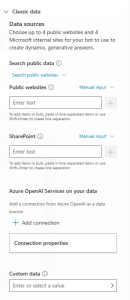
This capability works by pairing your copilot with a URL, such as contoso.sharepoint.com/sites/policies. When a copilot user asks a question and the copilot doesn’t have a topic to use for an answer, the copilot searches the URL and all sub-paths. For example, a URL such as contoso.sharepoint.com/sites also includes subpaths like contoso.sharepoint.com/sites/policies. Generative answers summarize this content into a targeted response.
Get access to Microsoft Copilot Studio – Licensing
This article includes details about Copilot Studio Licensing. You can also review the Microsoft Power Platform Licensing Guide to learn more.
If you already have licenses, see the Assign licenses and manage access to Microsoft Copilot Studio topic.
 |  |
Developer Environment license requirements
You need a Power Apps Developer plan to get a developer environment. This Developer plan is a viral/internal license that your admin needs to enable so that it can be assigned in the tenant. The license is assigned and verified during signup. The tenant must allow for viral or internal licenses for developer environment to be provisioned.
Manage admin roles with Microsoft Entra Privileged Identity Management (preview)
Use Microsoft Entra Privileged Identity Management (PIM) to manage high-privileged admin roles in the Power Platform admin center.
Changes to feature support
Microsoft doesn’t automatically assign the System Administrator role for users with these Microsoft Entra ID roles (also called tenant admins):
- Global administrator
- Power Platform administrator
- Dynamics 365 administrator
Extend Copilot capabilities with plugins
In Dynamics 365 Customer Service, agents use Copilot to resolve issues based on the corpus of data in their organization’s knowledge base or SharePoint. Additionally, we are introducing prompt plugins, enabling agents to securely access Dataverse data such as customers, products, and cases, through Copilot.
Learning Corner
How to create a canvas app connected to Microsoft Dataverse from scratch
Microsoft Dataverse is a premier data platform for Power Platform. Dataverse lets you securely store and manage data used by your apps within a set of tables.
In this article, we’ll create an app connected to existing data in a Power Platform environment.

Microsoft Learn Challenge – Microsoft Copilot Studio
Complete the Microsoft Copilot Studio challenge and earn a digital badge!
Create and deploy AI-empowered apps by accelerating foundational development and prototyping with low code. Developers can explore how to build apps, flows, and pages with Power Platform’s low-code tools and no-code interface. Create copilots with Microsoft Copilot studio. You will walk away equipped with the skills to innovate and lead in the evolving AI landscape.

Leave a comment