


It’s February and time for the release plans for 2024 release wave 1! Interested in the services our team offers? Find them here.
- Featured News
- Deprecations and Retirements
- Dataverse (legacy) connectors
- Activity Editor removed in model-driven apps
- Dynamics 365 for phones and tablets will be deprecated
- Power Apps portals Studio to be retired
- Model-driven app controls deprecation
- Omnichannel for Customer Service agent-facing app is deprecated and will be removed in June 2024
- Other Deprecation Articles
- Product Updates
- Copilot in Dynamics 365
- Monthly channel release for model-driven apps
- Power Apps January 2024 Feature Update
- Power Apps – General availability of Secure Implicit Connections
- Copilot Studio – How early adopters are transforming their organizations with copilots
- January 2024 update of Power Automate for Desktop
- Learning Corner
Featured News
2024 release wave 1
2024 release wave 1 plans were published on January 25, 2024
- This is a compilation of new capabilities planned to be released between April 2024 and September 2024
- See here the plans for Microsoft Dynamics 365 and Microsoft Power Platform
- For easy reading use the release planner
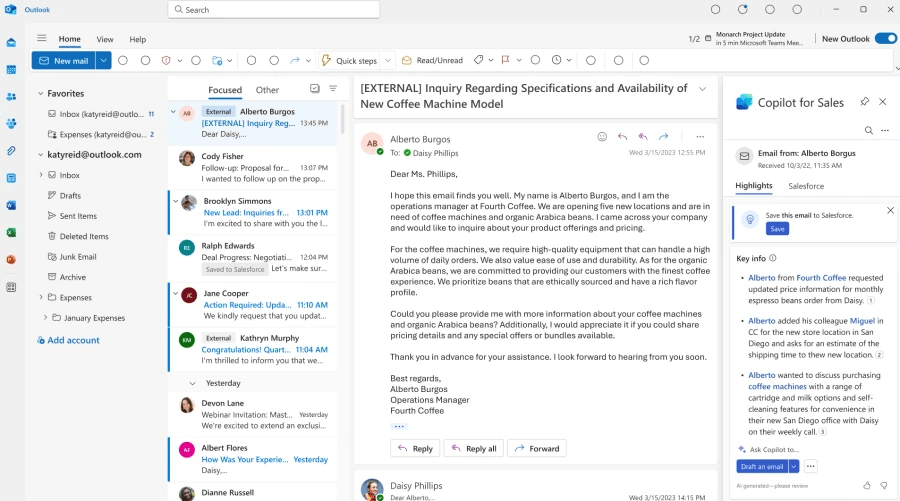
Microsoft Copilot for Sales and Copilot for Service are now GA
Now generally available, Microsoft Copilot for Sales and Microsoft Copilot for Service bring together the power of Microsoft Copilot for Microsoft 365 with role-specific insights and actions to streamline business processes, automate repetitive tasks, and unlock creativity.
Deprecations and Retirements
Dataverse (legacy) connectors
Microsoft Dataverse (legacy) connector is deprecated and replaced with another connector. The connector will continue to work in existing flows until a final date is announced in 2024. You’ll have one year from the date of announcement to move to the Microsoft Dataverse connector. For new and existing flows, customers should use the Microsoft Dataverse connector instead. Previously, the following features weren’t available in this connector:
As of January 2024, most flows using the legacy connector are recommended for migration with the exception of flows using “When a row is selected” trigger or triggering based on changes in other environments. An update will be shared in March 2024 on the Public Preview and GA timelines for these to be supported in the Microsoft Dataverse connector.
Activity Editor removed in model-driven apps
As part of a service update designed to improve security within Power Apps, we removed the deprecated Activity Editor control, and recommend the use of the rich text editor control. This change will be rolling out through January and February 2024.
Learn more >>
Dynamics 365 for phones and tablets will be deprecated
Effective April 2024, Dynamics 365 for phones and tablets (iOS and Android) will be deprecated for online users. Online users must migrate to the Power Apps mobile app. The Power Apps mobile app provides updated capabilities, a modern user experience, and fast load times.
Power Apps portals Studio to be retired
Effective February 26, 2024, Power Apps portals Studio will be retired. All sites open in Power Pages design studio.
Model-driven app controls deprecation
Effective January 2023, the following controls for model-driven apps are deprecated: auto-complete, input mask, multimedia player, number input, flip, and star rating.
- Starting April 2023, these controls can no longer be added to forms.
- Existing control instances will work on existing forms until April 2024.
Omnichannel for Customer Service agent-facing app is deprecated and will be removed in June 2024
Effective April 2023, the Omnichannel for Customer Service agent-facing app is deprecated. Support is available until June 2024. We recommend that you migrate your omnichannel configuration to Customer Service workspace. More information: Migrate from Omnichannel for Customer Service to Customer Service workspace
Other Deprecation Articles
The list of deprecations and retirements above is only a partial set of announcements. Review the articles below for a full list of deprecations that may affect your environment.
Important changes coming in Power Apps portals.
Important changes (deprecations) coming in Power Apps and Power Automate
Deprecated features in Dynamics 365 Sales
Deprecated features in Dynamics 365 Customer Service
Deprecated features in Dynamics 365 Field Service
Deprecated features in Universal Resource Scheduling
Removed or deprecated features in Finance and Operations apps
Product Updates
Copilot in Dynamics 365
Copilot in Dynamics 365 Sales:
For orgs in North America, Copilot chat is turned on by default in all the Dynamics 365 sales apps. Effective February 5, 2024, the following features are turned on by default for orgs in North America that have opted in for the 2024 release wave 1 update (early access). For information on other regions, click on the Learn More link below.
Copilot in Dynamics 365 Customer Service:
Starting January 19, 2024, Microsoft Copilot in Dynamics 365 Customer Service will be automatically installed and enabled in your Dynamics 365 Customer Service environment. This update will install the case summarization and conversation summarization features. These features are available to all users with a Dynamics 365 Customer Service Enterprise license.
Installation date: January 19 – February 2, 2024 – depending on geography of your organization. Click Learn More below for further information.
Monthly channel release for model-driven apps
Model-driven apps running in Power Platform environments with the app release channel value of Auto will use monthly channel starting with 2024 release wave 1. This is the next step in gradually shifting from semi-annual channel to monthly channel to provide users with improvements as they become available. Apps in Dynamics 365 enabled environments with the app release channel value of Auto will continue to use semi-annual channel until the 2024 release wave 2.
Feb 2024 Monthly Release:
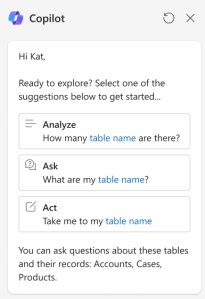
Copilot suggested prompts
End users can now get started with Copilot more easily by selecting and starting with one of the suggested prompts relevant to their app
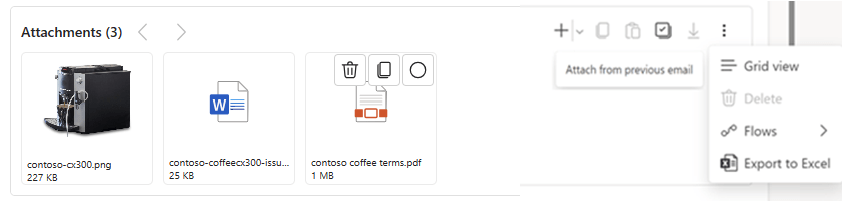
Enhanced email attachments
- Default experience (currently available via manual admin enablement)
- Drag and drop
- Copy attachments from one email to another
- Add previously used attachments
- Notification on copy and undo
Power Apps January 2024 Feature Update

Trust
- Announcing General availability of Power Platform Customer managed key auto key rotation with Azure key vault key versioning.
Maker Productivity
- Building new apps and tables with Maker Copilot is now available worldwide
- Drag and drop controls within and between containers!
- Create Formula columns using Natural Language
- Inactive editor capability now available in Canvas Copresence
- Dependent Assembly is now Generally Available
- New Performant APIs are now Generally Available
End User Productivity
- Optimize screens for mobile devices with stunning native UI/UX
- 2023 recap and what is coming for modern controls in 2024
- Announcing seamless Dataverse image and file support in canvas offline apps
Power Apps – General availability of Secure Implicit Connections
- Secure implicitly shared connections are now generally available and are available in all regions.
- This feature provides a secure layer of protection for fixed credential connections such as SQL Server basic auth (i.e., connection string username and password.) All new apps now use this feature. Older apps must be converted to use this feature (if not already converted) and previously shared connections unshared.
- With this new feature, connections are no longer shared with other makers. Instead, the app now interacts with a connection proxy object that only allows queries from the app and only allows the types of queries that are in the app.
Copilot Studio – How early adopters are transforming their organizations with copilots

It’s an exciting time for Microsoft Copilot, and we are thrilled to share all of the latest news, early customer testimonials and resources to get you started. At Ignite, we announced the General Availability of Microsoft Copilot Studio. Power Virtual Agents is now part of Copilot Studio, enabling you to create custom copilots.
We’re grateful to our early customers who have already adopted Copilot Studio and are building amazing solutions for their end-users. Learn more about their highlights!
January 2024 update of Power Automate for Desktop

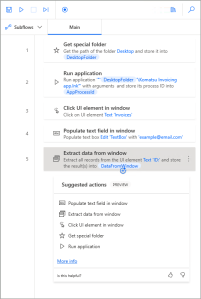
- Suggested actions panel (preview): Use AI to generate a list of possible actions that users can add to their flows, based on the previous steps
- Blank values and optional input variables: Power Automate for desktop now supports blank values, which are different from empty text string values.
- Single sign-on: Power Automate for desktop now supports single sign-on, which means that users can sign in faster with the account they used to sign in to their Windows session
- New actions:
- Word actions
- Update work queues item processing notes
- Create HTML content
- Attach SAP GUI
- SharePoint – Create new document set
Learning Corner
Deep dive into Dataverse search capabilities
In model-driven apps, the Dataverse search box is always available at the top of every page in your app. Deep dive into all the capabilities to improve your searches and get more value!
- Recent rows and searches
- Inline suggestions
- Top Results/table specific tabs
- Filter results by using facets
- Boolean operators and wildcards
- Exact matches
- Quick actions
- Keyboard shortcuts
- Interprets natural language such as misspellings, common abbreviations, and synonyms
Power Up Program – Prepare for Tomorrow
Looking for new career growth opportunities?
- By 2025, 70% of new applications developed by enterprises will use low-code or no-code technologies, up from less than 25% in 2020. (Gartner)
- Microsoft Power Up Program enables non-tech professionals to successfully advance into a new career path in low-code application development using Microsoft Power Platform.
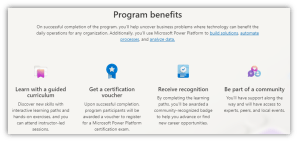
Microsoft Power Platform training and certifications
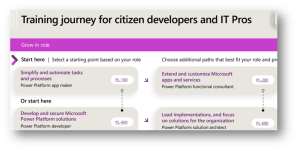
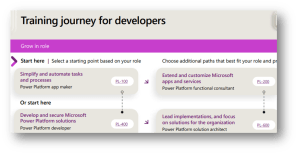
Training journeys – This guide is designed to outline the training and certification options that can help you achieve your personal and professional goals.
Video Roundup
This content is brought to you by the Microsoft Customer Success Business Applications team. Interested in learning more about the services we offer? Get more information here!

Leave a comment